Meet Lensey, the Photo Assistant App for iOS and Android
A photo assistant app puts everything you check before pressing the shutter — light, timing, camera settings, and the edit after — into one tool on your phone. This guide explains what such an app does, who it is for, and how Lensey, released in October 2026 for iOS and Android, approaches each step.
What is a photo assistant app?
Photography has three distinct phases, and most apps cover only one of them. There is the planning phase (when and where the light will be good), the shooting phase (which shutter speed, aperture, and ISO to use), and the editing phase (turning the raw file into the image you imagined).
A photo assistant app is built around all three. Instead of juggling a golden hour calculator, a notebook with camera settings, and a separate editor, you keep the whole workflow in your pocket. That matters most in the field, where time is short and the light changes by the minute.
Plan the light before you leave home
Good photos start hours before you arrive at the location. The position of the sun decides where shadows fall, which façades glow, and how long you have before the light turns flat.
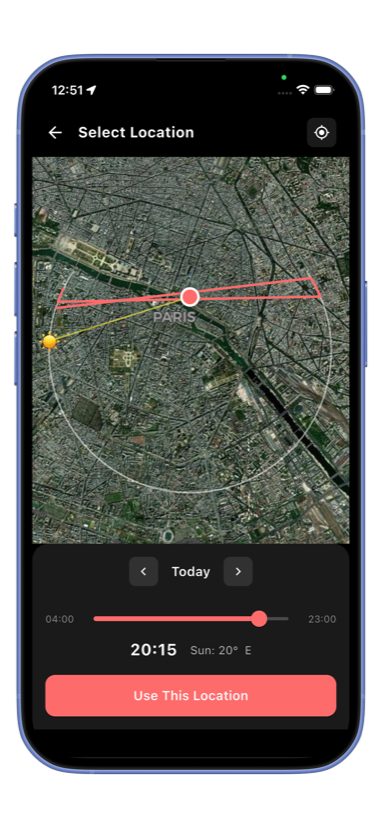
A few things worth checking at home:
- Sunrise and sunset times for your exact location — the golden hour window is usually under an hour, and it is shorter in winter than in summer.
- The sun's trajectory across the location — a spot that looks dramatic at noon can be dull at dawn, and vice versa.
- The weather — thin clouds can give you soft, even light for portraits; clear skies give hard shadows and deep contrast. Both are useful, but you should know which one you are getting.
Knowing these numbers lets you arrive early, set up calmly, and shoot through the best minutes instead of missing them while you scout.
Get the settings right in the field
The most common question beginners ask is some version of: "My photo came out blurry — why?" Almost always the answer is a setting problem, not a gear problem. A shutter speed too slow for the focal length, an aperture too wide for the group you are photographing, or an ISO pushed so high that noise eats the detail.
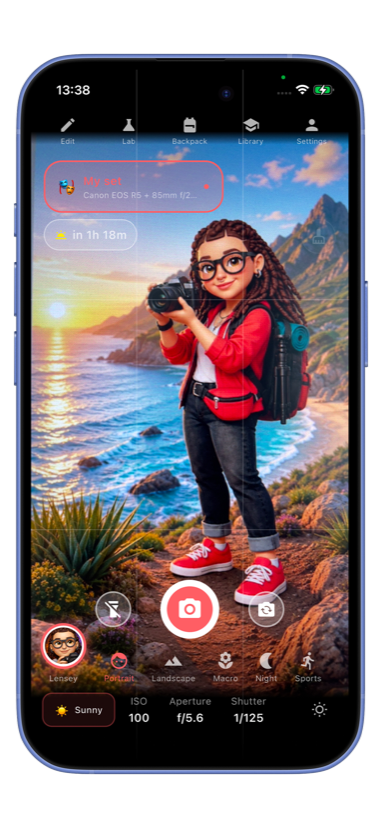
The catch is that the "right" setting depends on the camera and lens you actually have in your hands. A 200mm telephoto lens needs a much faster shutter speed than a 35mm, and a full-frame camera tolerates higher ISO than a phone sensor.
This is where Lensey's Field Assistant fits in: it looks at your camera and lens and suggests shutter speed, aperture, and ISO for the scene in front of you, then adapts as the light changes. You stay in control of the creative decision; the app handles the arithmetic.
The habit that improves photos fastest is simple: before you shoot, ask yourself three questions. What needs to be sharp? Is anything moving? How much light do I have? Translate the answers into aperture, shutter speed, and ISO — and the photo almost takes itself.
Edit and rescue shots afterward
Even well-planned shots come home with problems: a background that distracts, a stranger walking through the frame, skin that needs a gentle cleanup, or a crop that left the image too small to print.
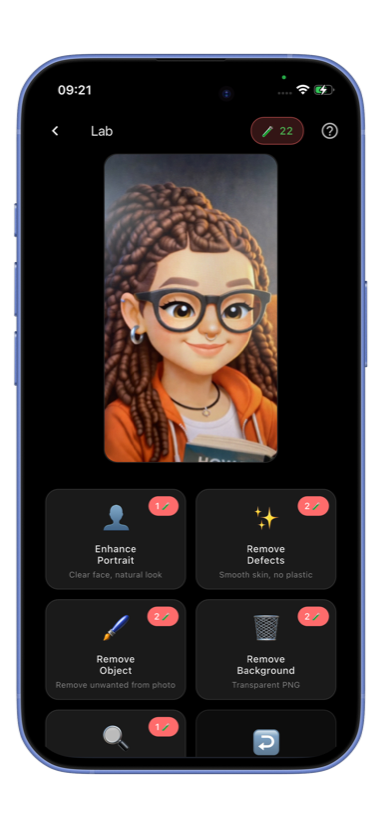
Modern AI editing handles each of these in seconds instead of hours:
- Portrait retouch and enhancement restores skin texture and fixes flat light without the plastic look.
- Object removal erases photobombers, trash bins, and power lines.
- Background removal isolates a subject for product shots or composites.
- Upscaling rebuilds detail so a tight crop can still print large.
Lensey's Lab runs all of these in the app, so a rescue happens while you are still on location — often the difference between keeping a frame and deleting it.
Who a photo assistant app is for
- Beginners with a new camera. The jump from a phone to a camera with dials is steep; guided settings shorten the learning curve from months to weeks.
- Phone photographers. Planning light and composition improves phone photos just as much as camera photos.
- Travelers. You get one evening in a city; knowing exactly when and where the light peaks is a real advantage.
- Portrait and family shooters. Fast, reliable settings mean you capture the moment instead of fiddling with dials.
What to look for when choosing one
When you compare photo assistant apps, check five things:
- Does it know your gear? Advice that ignores your camera and lens is generic at best and wrong at worst.
- Does it work offline? Cell coverage disappears exactly where the best landscapes are.
- Is the advice explainable? You should learn why a setting works, not just receive a number.
- Does it cover the whole workflow? Planning, shooting, and editing in one place beats three disconnected apps.
- Is it honest about costs? Prefer apps that tell you the price up front.
Try it in Lensey
Lensey is a photo assistant for iOS and Android: Golden Hour times for your location, Sun Map trajectories, and the Lab for AI editing. Download on the App Store · Get it on Google Play